46
| You could use an external (parsed) general entity.
You declare the entity like this:
Then you reference it like this:
A complete example:
When the XML parser reads the file, it will expand the entity reference and include the referenced XML file as part of the content.
If the "otherFile.xml" contained:
<baz>this is my content</baz>
Then the XML would be evaluated and "seen" by an XML parser as:
A few references that might be helpful:
|
Thursday, April 2, 2015
Importing XML file in an XML file...

Friday, March 27, 2015
Using svn 1.8 in eclipse on Mac OS X
sudo -s
Create a symbolic link to your Xcode toolchain:
ln -s /Applications/Xcode.app/Contents/Developer/Toolchains/XcodeDefault.xctoolchain/ /Applications/Xcode.app/Contents/Developer/Toolchains/OSX10.10.xctoolchainDownload SVN 1.8 sources
cd ~/Downloads/
curl -o subversion-1.8.9.tar.gz http://archive.apache.org/dist/subversion/subversion-1.8.9.tar.gz
tar -xvf subversion-1.8.9.tar.gz
Compile SVN 1.8 from sources
cd ~/Downloads/subversion-1.8.9
sh get-deps.sh serf
cd serf/
./configure
make
make install

export CC=/Applications/Xcode.app/Contents/Developer/Toolchains/OSX10.10.xctoolchain/usr/bin/cc
cd ..
./configure --prefix=/usr/local --enable-javahl --with-serf=/usr/local/serf

make
sudo make install
make javahl
sudo make install-javahl
$ cd /Library/Java/Extensions /Library/Java/Extensions $ sudo ln -sf /usr/local/lib/libsvnjavahl-1.dylib /Library/Java/Extensions $ sudo ln -sf /usr/local/lib/libsvnjavahl-1.jnilib /Library/Java/Extensions $ ls -l total 16 lrwxr-xr-x 1 root admin 35B 29 Jun 13:59 libsvnjavahl-1.dylib@ -> /usr/local/lib/libsvnjavahl-1.dylib lrwxr-xr-x 1 root admin 36B 29 Jun 13:59 libsvnjavahl-1.jnilib@ -> /usr/local/lib/libsvnjavahl-1.jnilib
Sunday, February 1, 2015
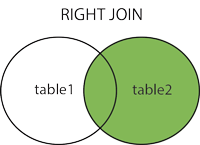
SQL Right Join
SQL RIGHT JOIN Keyword
The RIGHT JOIN keyword returns all rows from the right table (table2), with the matching rows in the left table (table1). The result is NULL in the left side when there is no match.
SQL RIGHT JOIN Syntax
SELECT column_name(s)
FROM table1
RIGHT JOIN table2
ON table1.column_name=table2.column_name;
FROM table1
RIGHT JOIN table2
ON table1.column_name=table2.column_name;
or:
SELECT column_name(s)
FROM table1
RIGHT OUTER JOIN table2
ON table1.column_name=table2.column_name;
FROM table1
RIGHT OUTER JOIN table2
ON table1.column_name=table2.column_name;
PS! In some databases RIGHT JOIN is called RIGHT OUTER JOIN.
SQL Left Join
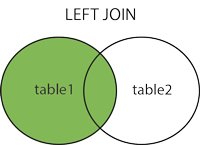
SQL LEFT JOIN Keyword
The LEFT JOIN keyword returns all rows from the left table (table1), with the matching rows in the right table (table2). The result is NULL in the right side when there is no match.
SQL LEFT JOIN Syntax
SELECT column_name(s)
FROM table1
LEFT JOIN table2
ON table1.column_name=table2.column_name;
FROM table1
LEFT JOIN table2
ON table1.column_name=table2.column_name;
or:
SELECT column_name(s)
FROM table1
LEFT OUTER JOIN table2
ON table1.column_name=table2.column_name;
FROM table1
LEFT OUTER JOIN table2
ON table1.column_name=table2.column_name;
PS! In some databases LEFT JOIN is called LEFT OUTER JOIN.
Friday, January 2, 2015
Recover from Eclipse crash.... copy paste
I encountered a horrible sight; eclipse would start and all of a sudden just crash.
I first tried the obvious solution, to clean out the workspace.

 If you do not see your projects just make sure your Deselect Working Sets

./eclipse -cleanNope, no go, still eclipse kept crashing. Ugh, I fell into despair, all those key-binds and spring templates, all gone. So, rationally I hopped on to #eclipse on irc.freenode.net to get some feed back on my situation. Rcjsuen was kind enough to provide the answer that would solve my problem. The solution was fairly straight forward. I had to remove org.eclipse.core.resources from my workspace.
cd ~/Documents/workspace/.metalog/.plugins
rm -rf  org.eclipse.core.resources
By removing org.eclipse.core.resources, you clear out all the project metadata from your workspace. However, don’t worry, once you start eclipse you can just go to “File -> Import -> import eclipse projects” and re-import all your workspace projects.

 If you do not see your projects just make sure your Deselect Working Sets

Sunday, December 28, 2014
ui-grid / ng-grid 3.0 and double click row feature...
To my sad experience the comment that double click was not provided because of touch devices was a mistery. So after many hours with my limited knowledge found a way to add the double click with uiGrid v3.0.0.
First your app.js file add the following directive:
directive('dblClickRow', [
    '$compile',
    function($compile, $parse, $log) {
      return {
        priority : -190, // run after default uiGridCell directive
        restrict : 'A',
        scope : false,
        link : function($scope, $elm, $attrs, $log) {
          if ($scope.grid.options.enableRowSelection && !$scope.grid.options.enableRowHeaderSelection) {
            $elm.addClass('ui-grid-disable-selection');
            registerRowSelectionEvents();
          }
          function registerRowSelectionEvents() {
            $elm.on('dblclick', function(evt) {
              $log.log("double click on row", evt);
            });
          }
        } };
    } ])    ;
Next you setup your grid with the following rowTemplate in your grid controller...
$templateCache.put('ui-grid/ui-grid-row',
     + "<div " //
     + " ng-repeat=\"(colRenderIndex, col) in colContainer.renderedColumns track by col.colDef.name\" class=\"ui-grid-cell\" ng-class=\"{ 'ui-grid-row-header-cell': col.isRowHeader }\"" + " ui-grid-cell dbl-click-row></div>");
Next in your grid setup .... register the event and run with it ...
var selectedRow;
$scope.gridOptions.onRegisterApi = function(gridApi) {
  $scope.gridApi = gridApi;
  gridApi.selection.on.rowSelectionChanged($scope, function(row) {
    var msg = 'row selected ' + row.isSelected;
    if (row.isSelected) {
      selectedRow = row;
    }
    else {
      selectedRow = undefined;
    }
    $log.log(selectedRow);
  });
  gridApi.registerEvent('selection', 'dblClick');
  gridApi.selection.on.dblClick($scope, function() {
    if (selectedRow) {
      $scope.open(selectedRow.entity);
    }
  });
};
Wednesday, October 22, 2014
List All Perl Modules That Are Installed On My Current System
One liner:
perl -MFile::Find=find -MFile::Spec::Functions -Tlwe 'find { wanted => sub { print canonpath $_ if /\.pm\z/ }, no_chdir => 1 }, @INC'
Subscribe to:
Posts (Atom)