Showing posts with label eclipse. Show all posts

Monday, May 1, 2017

Syntax for Maven / Eclipse Lifecycle mapping

New syntax for specifying lifecycle mapping metadata

A new syntax has been introduced to simplify lifecycle mapping metadata for plugin executions, using processing instructions within plugin/executions/execution nodes.
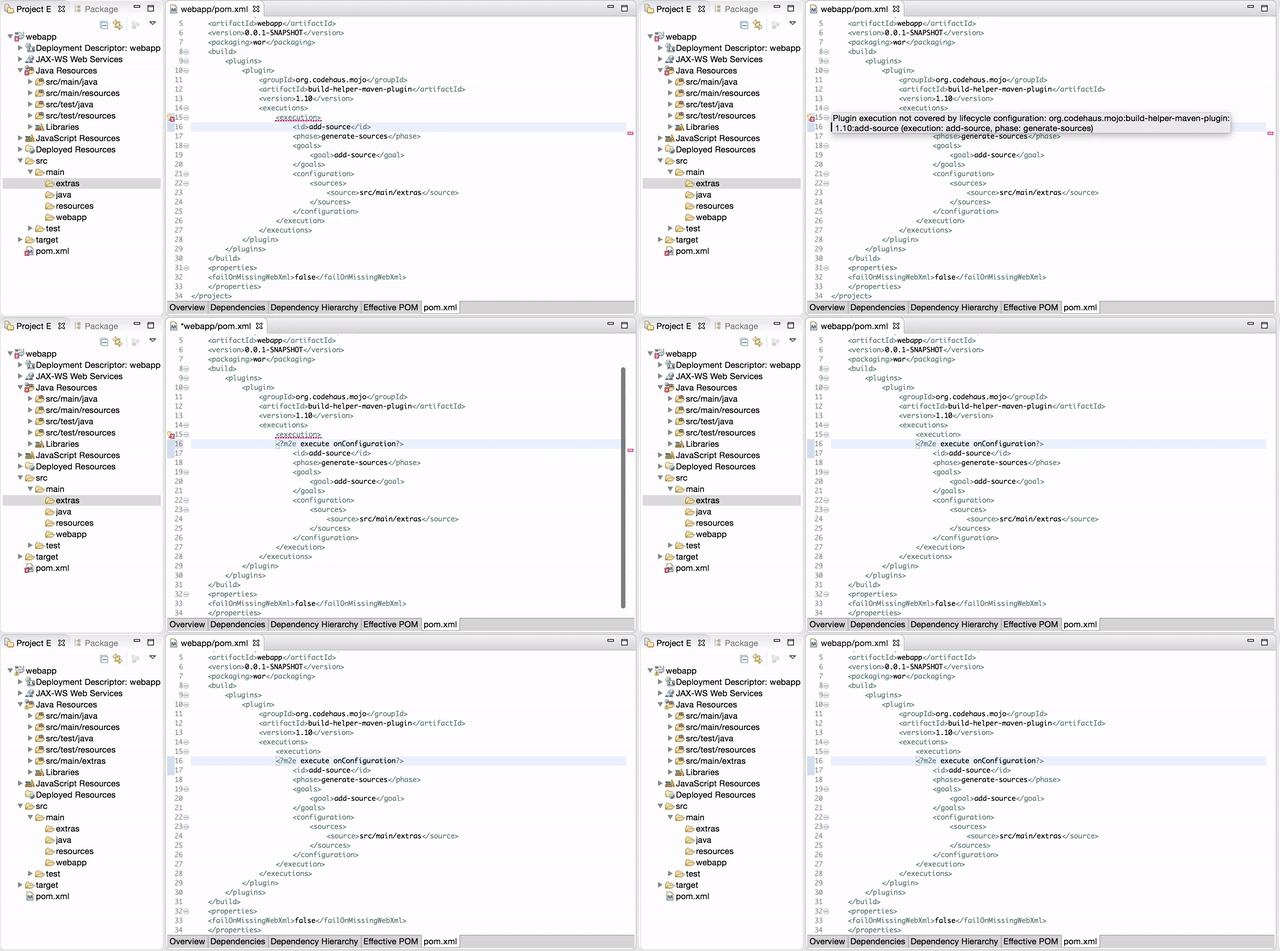
processing instructions for lifecycle mapping
Supported syntax:
  • <?m2e ignore?> this execution will be ignored;
  • <?m2e execute?> this execution will be executed once on project import;
  • <?m2e execute onConfiguration?> this execution will be executed on every Project Configuration update;
  • <?m2e execute onIncremental?> this execution will be executed on every incremental build;
  • <?m2e execute onConfiguration,onIncremental?> this execution will be executed on every Project Configuration update and every incremental build;
  • <?m2e configurator configuratorId?> this execution will be delegated to the matching m2e configurator.
Each instruction can be placed in the <execution> node, this way it applies on this exact execution or on any execution of the same plugin with the same executionId in child pom. It can also be placed in a <plugin> node, this way it acts the same as a dedicated <pluginManagement> section which lists all goals of this plugin.
Please be aware there are currently no Quick Fixes available to automatically inject these new instructions when a “Plugin Execution Not Covered” error marker is found.

Wednesday, July 6, 2016

Eclipse Search File in Popup Menu - Eclipse Mars 4.5.

Creating a File Menu in Eclipse...


  <extension
         point="org.eclipse.ui.menus">
      <menuContribution
            allPopups="true"
            locationURI="popup:org.eclipse.ui.popup.any?after=additions">
         <command
               commandId="org.eclipse.search.ui.openFileSearchPage"
               label="File Search..."
               style="push">
            <visibleWhen
                  checkEnabled="true">
            </visibleWhen>
         </command>
      </menuContribution>
   </extension>

Tuesday, May 31, 2016

Eclipse 4.5 - Mars - OSX - can't open my workspace - not responding

Try starting it with -clean, if that doesn't work 
try deleting .metadata/.plugins/org.eclipse.e4.workbench/ contents.

Friday, January 2, 2015

Recover from Eclipse crash.... copy paste

I encountered a horrible sight; eclipse would start and all of a sudden just crash. I first tried the obvious solution, to clean out the workspace.
./eclipse -clean
Nope, no go, still eclipse kept crashing. Ugh, I fell into despair, all those key-binds and spring templates, all gone. So, rationally I hopped on to #eclipse on irc.freenode.net to get some feed back on my situation. Rcjsuen was kind enough to provide the answer that would solve my problem. The solution was fairly straight forward. I had to remove org.eclipse.core.resources from my workspace.
cd ~/Documents/workspace/.metalog/.plugins
rm -rf  org.eclipse.core.resources
By removing org.eclipse.core.resources, you clear out all the project metadata from your workspace. However, don’t worry, once you start eclipse you can just go to “File -> Import -> import eclipse projects” and re-import all your workspace projects. If you do not see your projects just make sure your Deselect Working Sets

Thursday, November 22, 2012

Eclipse: edit locally and automatic rsync as part of the build

So I have this project that I love to edit, but need to build and deploy on a different target system (in my case OSX to Linux) I also love to edit in Eclipse, and use rsync as the fastest way to get stuff on the target machine. The remote systems explorer just did not cut it... however I ended up flipping between eclipse and terminal (rsync) to get things synced up.... Answer: add a builder launcher that invokes the rsync script as part of the autobuild... Here the simple rsync script that I placed in root of the maintenance-ui project (chmod it to 755)
rsync -avz --exclude '.svn' --exclude 'target' --delete *  myuserid@myhost.com:./projects/maintenance-ui
Here the launch file
<?xml version="1.0" encoding="UTF-8" standalone="no"?>
<launchConfiguration type="org.eclipse.ui.externaltools.ProgramBuilderLaunchConfigurationType">
<booleanAttribute key="org.eclipse.debug.ui.ATTR_LAUNCH_IN_BACKGROUND" value="true"/>
<stringAttribute key="org.eclipse.ui.externaltools.ATTR_LOCATION" value="${workspace_loc:/maintenance-ui/rsync.sh}"/>
<stringAttribute key="org.eclipse.ui.externaltools.ATTR_RUN_BUILD_KINDS" value="full,auto,"/>
<booleanAttribute key="org.eclipse.ui.externaltools.ATTR_TRIGGERS_CONFIGURED" value="true"/>
<stringAttribute key="org.eclipse.ui.externaltools.ATTR_WORKING_DIRECTORY" value="${workspace_loc:/maintenance-ui}"/>
</launchConfiguration>
Now you could and can use the remote systems explorer in Eclipse to run your remote build and you will never have to leave Eclipse and alt tabbing around.

Wednesday, October 7, 2009

Eclipse over XWindows

Running and rendering the remote XWin session of eclipse.
61  set | grep SSH
[me@remote ~]$ set | grep SSH
SSH_ASKPASS=/usr/libexec/openssh/gnome-ssh-askpass
SSH_CLIENT='172.18.153.150 49238 22'
SSH_CONNECTION='172.18.153.150 49238 10.10.10.3 22'
SSH_TTY=/dev/pts/3
Use the SSH_CONNECTION ip listed on local to export
60  xhost +  
70  ssh -X foouser@ip_remote_host 'export DISPLAY=172.18.153.150:0;/opt/eclipse-3.3.1.1-europa/eclipse/eclipse'
Do not use the hostname or worse alias for the remote but use the remote ip address in our example 10.10.10.3 When you do not have a local Xserver running you might see this:... if thats the case change your myhostnameasalias to the network IP address of the remote host, 10.10.10.3..
me@local $ ssh -X 'me@myhostnameasalias' 'export DISPLAY=172.18.153.150:0;java -Xmx1536m -Xms1024m -jar myjar.jar '
Warning: untrusted X11 forwarding setup failed: xauth key data not generated
Warning: No xauth data; using fake authentication data for X11 forwarding.
Jun 21, 2012 12:01:18 PM java.util.prefs.FileSystemPreferences$2 run
INFO: Created user preferences directory.
Exception occurred in main() of MyProgram
java.lang.NoClassDefFoundError: Could not initialize class sun.awt.X11GraphicsEnvironment
 at java.lang.Class.forName0(Native Method)
 at java.lang.Class.forName(Class.java:169)
 at java.awt.GraphicsEnvironment.getLocalGraphicsEnvironment(GraphicsEnvironment.java:68)
 at sun.awt.X11.XToolkit.(XToolkit.java:89)
 at java.lang.Class.forName0(Native Method)
 at java.lang.Class.forName(Class.java:169)
 at java.awt.Toolkit$2.run(Toolkit.java:834)
 at java.security.AccessController.doPrivileged(Native Method)
 at java.awt.Toolkit.getDefaultToolkit(Toolkit.java:826)
 at sun.swing.SwingUtilities2$AATextInfo.getAATextInfo(SwingUtilities2.java:120)
 at javax.swing.plaf.metal.MetalLookAndFeel.initComponentDefaults(MetalLookAndFeel.java:1556)
 at javax.swing.plaf.basic.BasicLookAndFeel.getDefaults(BasicLookAndFeel.java:130)
 at javax.swing.plaf.metal.MetalLookAndFeel.getDefaults(MetalLookAndFeel.java:1591)
 at javax.swing.UIManager.setLookAndFeel(UIManager.java:514)
 at javax.swing.UIManager.setLookAndFeel(UIManager.java:554)
To solve this ....