<item>
<name>Autoselect Copy</name>
<identifier>private.autoselect_copy</identifier>
<only>TERMINAL</only>
<autogen>
__PointingButtonToKey__
PointingButton::LEFT, ModifierFlag::NONE,
KeyCode::VK_MODIFIER_EXTRA1,
Option::KEYTOKEY_BEFORE_KEYDOWN,
KeyCode::VK_MOUSEKEY_LOCK_BUTTON_LEFT,
KeyCode::VK_LOCK_EXTRA2_FORCE_ON,
<!-- VK_LOCK_EXTRA2 is necessary for Middle Button to Command+Tab (Switch
Applications) -->
Option::KEYTOKEY_AFTER_KEYUP,
KeyCode::VK_MOUSEKEY_LOCK_BUTTON_ALL_FORCE_OFF,
KeyCode::C, ModifierFlag::COMMAND_L,
KeyCode::VK_LOCK_EXTRA2_FORCE_OFF
</autogen>
</item>
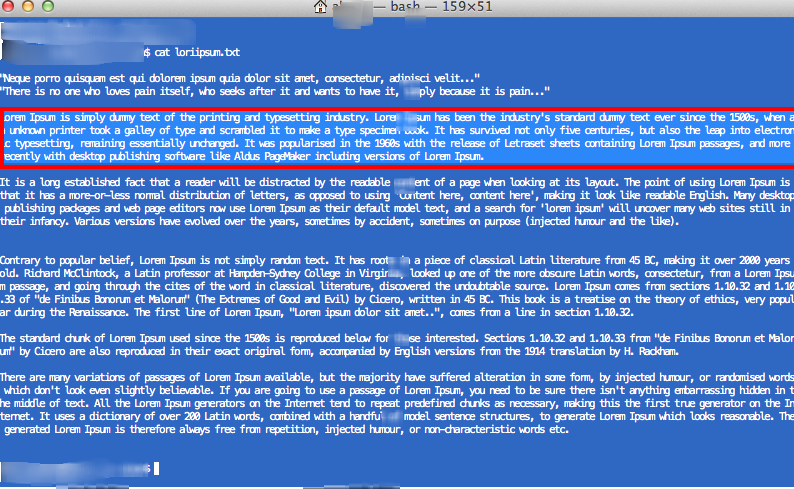
After this I can paste the text... in this example my stickies.
Rants and ravings of a semi-autistic developer who has a hard time remembering idiotic nonsense details. Why remember it, when you know where to find it.
Showing posts with label xwin. Show all posts
Monday, November 25, 2013
KeyRemap4MacBook implement XWindows auto select with Mouse Gestures.
I love the Xwindows feature that you can auto copy selected text from a cursor selection. So this is the scenario, when I select a piece of text I would like it to be stored in the buffer/clipboard with control-C after I lift my mouse button. I don't need the paste function however could easily be implemented as well.
With KeyRemap4MacBook your can rearrange your input events.
Here the snippet I use for the TERMINAL application to do just so:
Friday, February 3, 2012
Mac OSX - running xterm and X11 xhost: unable to open display
So alright you have Mac OSX. Yay I
I have a VPN to the office. Yay II (ip vpn adapter: 172.18.146.250)
I have oodles of linux boxes! Yay III
The problem:
One odd ball process on my linux will throw a X11 Graphics error so how to get around that....
Try 1: Do the standard export and xhost + trick
open Terminal.app and run:
computer:~ ~$ export DISPLAY=172.18.146.250:0 computer:~ ~$ xhost + xhost: unable to open display "172.18.146.250:0" computer:~ ~$Thats not right... lets start the Xserver in background (X Server startcmd is 'X').... and do this again...
computer:~ ~$ X &
launch_msg("CheckIn") IPC failure: Operation not permitted
Xquartz: Unable to locate waiting server: org.x.X11
Xquartz: X11.app = /Applications/Utilities/X11.app/Contents/MacOS/X11
Xquartz: Starting X server: /Applications/Utilities/X11.app/Contents/MacOS/X11 --listenonly
..SCM BUILD BOX profile been setup..
================================================
X11.app: main(): argc=2
argv[0] = /Applications/Utilities/X11.app/Contents/MacOS/X11.bin
argv[1] = --listenonly
Waiting for startup parameters via Mach IPC.
X11.app: No launchd socket handed off, unsetting DISPLAY
X11.app: do_start_x11_server(): argc=1
argv[0] = X
Xquartz starting:
X.Org X Server 1.4.2-apple56
Build Date: 20100624
(EE) XKB: Couldn't open rules file /usr/X11/share/X11/xkb/rules/base
computer:~ ~$
Try 2:
Now open the xterm under the X11 Application that has been started...
bash-3.2$ export DISPLAY=172.18.146.250:0 bash-3.2$ xhost + access control disabled, clients can connect from any host bash-3.2$
Friday, October 16, 2009
Cygwin wmaker failures on the wmaker.inst
Removing the errors that occur on the wmaker.inst directory not found ... change the Documents And Settings to the Docume~1 (8 char) notation in the .bashrc
export HOME="/cygdrive/c/Docume~1/MyUserName"
Wednesday, October 7, 2009
Eclipse over XWindows
Running and rendering the remote XWin session of eclipse.
61 set | grep SSH [me@remote ~]$ set | grep SSH SSH_ASKPASS=/usr/libexec/openssh/gnome-ssh-askpass SSH_CLIENT='172.18.153.150 49238 22' SSH_CONNECTION='172.18.153.150 49238 10.10.10.3 22' SSH_TTY=/dev/pts/3Use the SSH_CONNECTION ip listed on local to export
60 xhost + 70 ssh -X foouser@ip_remote_host 'export DISPLAY=172.18.153.150:0;/opt/eclipse-3.3.1.1-europa/eclipse/eclipse'Do not use the hostname or worse alias for the remote but use the remote ip address in our example 10.10.10.3 When you do not have a local Xserver running you might see this:... if thats the case change your myhostnameasalias to the network IP address of the remote host, 10.10.10.3..
me@local $ ssh -X 'me@myhostnameasalias' 'export DISPLAY=172.18.153.150:0;java -Xmx1536m -Xms1024m -jar myjar.jar ' Warning: untrusted X11 forwarding setup failed: xauth key data not generated Warning: No xauth data; using fake authentication data for X11 forwarding. Jun 21, 2012 12:01:18 PM java.util.prefs.FileSystemPreferences$2 run INFO: Created user preferences directory. Exception occurred in main() of MyProgram java.lang.NoClassDefFoundError: Could not initialize class sun.awt.X11GraphicsEnvironment at java.lang.Class.forName0(Native Method) at java.lang.Class.forName(Class.java:169) at java.awt.GraphicsEnvironment.getLocalGraphicsEnvironment(GraphicsEnvironment.java:68) at sun.awt.X11.XToolkit.To solve this ....(XToolkit.java:89) at java.lang.Class.forName0(Native Method) at java.lang.Class.forName(Class.java:169) at java.awt.Toolkit$2.run(Toolkit.java:834) at java.security.AccessController.doPrivileged(Native Method) at java.awt.Toolkit.getDefaultToolkit(Toolkit.java:826) at sun.swing.SwingUtilities2$AATextInfo.getAATextInfo(SwingUtilities2.java:120) at javax.swing.plaf.metal.MetalLookAndFeel.initComponentDefaults(MetalLookAndFeel.java:1556) at javax.swing.plaf.basic.BasicLookAndFeel.getDefaults(BasicLookAndFeel.java:130) at javax.swing.plaf.metal.MetalLookAndFeel.getDefaults(MetalLookAndFeel.java:1591) at javax.swing.UIManager.setLookAndFeel(UIManager.java:514) at javax.swing.UIManager.setLookAndFeel(UIManager.java:554)
Cygwin Xwin startx
Default installation of cygwin and Xwindows
There are two ways of starting up:
- opening a bash-shell window and run startx
- opening explorer and run startxwin.bat from /usr/bin
- create ~/.bash_profile
export HOME="C:/Docume~1/[uid]
- create ~/.xserverrc
X :0 -clipboard -silent-dup-error
- create ~/.xinitrc
exec wmakerregarding 2)
Subscribe to:
Posts (Atom)