sub adjusttype {
 my ($record) = @_;
SWITCH: {
  (
        $y[0] =~ /Local/
    or $y[0] =~ /Announc/
  ) && do { $record->{type} = 'Talk'; last SWITCH; };
  ( $y[0] =~ /and answers/ )
   && do { $record->{type} = 'Question and answers'; last SWITCH; };
  ( $y[0] )
   && do {    # strip the type from the title (if exists)
   $record->{title} =~ s/$y[0]//g;
   $record->{type} = $y[0];
   last SWITCH;
   };
 }
Wednesday, November 16, 2011
Switch/case with regular expressions in Perl
Creating a switch/case in perl with regular expressions are the input, similar to bash' wildcarding.

Tuesday, November 1, 2011
For Do Loop in Bash as one liner
Take note of the semi-colons ... that is the key
$ for i in {1..35}; do echo $i; done;
Friday, June 3, 2011
Maven XJC generation XMLSchemaType for date / dateTime missing
I've noticed a mishap with the xsd:date and xsd:dateTime conversions to Java objects. There are posts out there to avoid it or just modify the generated code but thats not what I want.
With the xsd defined as:

The 1.1 version of the com.sun.tools.xjc.maven2:maven-jaxb-plugin will not generate the XMLSchemaType "dateTime" however the 1.1.1 version does generate the correct XMLSchemaType.
By comparison if you choose to use the org.jvnet.jaxb2.maven2:maven-jaxb2-plugin it will generate the XMLSchemaType.
Here the comparison between 1.1 and 1.1.1 of the com.sun.tools.xjc.maven2:maven-jaxb-plugin.
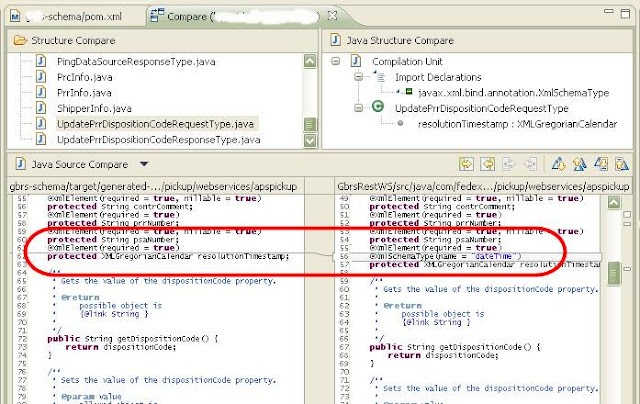
With the xsd defined as:

The 1.1 version of the com.sun.tools.xjc.maven2:maven-jaxb-plugin will not generate the XMLSchemaType "dateTime" however the 1.1.1 version does generate the correct XMLSchemaType.
By comparison if you choose to use the org.jvnet.jaxb2.maven2:maven-jaxb2-plugin it will generate the XMLSchemaType.
Here the comparison between 1.1 and 1.1.1 of the com.sun.tools.xjc.maven2:maven-jaxb-plugin.

<plugin>
                <groupId>com.sun.tools.xjc.maven2</groupId>
                <artifactId>maven-jaxb-plugin</artifactId>
                <version>1.1.1</version>
                <executions>
                    <execution>
                        <phase>generate-sources</phase>
                        <goals>
                            <goal>generate</goal>
                        </goals>
                    </execution>
                </executions>
                <configuration>
                    <removeOldOutput>true</removeOldOutput>
                    <schemaDirectory>src/main/schema/</schemaDirectory>
                    <includeSchemas>
                        <includeSchema>**/*.xsd</includeSchema>
                    </includeSchemas>
                    <strict>true</strict>
                    <verbose>false</verbose>
                    <extension>true</extension>
                    <readOnly>yes</readOnly>
                </configuration>
            </plugin>
Monday, May 9, 2011
Thursday, May 5, 2011
cygwin: killing inactive sessions from ps
Its probably not the shortest oneliner however it does the job in CYGWIN.
$ ps -a | grep '^I' | perl -pe '@x=split;print $x[1],"\n";$_=undef'| xargs -i{}
 -t kill -9 {}
Wednesday, February 23, 2011
RDP reboot remote machine
If you've ever used the Remote Desktop Protocol to login to a remote Windows computer, you've probably noticed that the Start, Shutdown options you're used to seeing on a local Windows session aren't there. Instead, you'll typically see an option to "disconnect," in effect saving your session for the next time you login, or to "log off," essentially logging off of your remote session without saving the state.
So what do you do if you actually want to restart the remote machine? I did some digging tonight and found the answer kind of ambiguously buried in some disorganized information about Remote Desktop:
So what do you do if you actually want to restart the remote machine? I did some digging tonight and found the answer kind of ambiguously buried in some disorganized information about Remote Desktop:
The trick is to click on the desktop and type Alt+F4. This will call up the shutdown dialog, where you get the usual shutdown options like "Shut down", "Shut down without installing updates", "Restart", "Stand by", and "Hibernate".
Friday, February 4, 2011
lsof: poor mans list open files
list open files per process
ps aux | grep weblogic.Name | grep -v grep | perl -ne '@x=split;my(@c)=glob("/proc/$x[1]/fd/*");printf "%5d %s open files.\n",$x[1],scalar @c;'
Subscribe to:
Posts (Atom)