$ find . -type f -name '*.pdf' |
      perl -ne 'BEGIN {  my @c=() }
          {     push @c, $_;$_=undef; }
                END {my $n=65; foreach (@c)
                { chomp; $x=$x.sprintf " %c=\"%s\"", $n,$_;$y=$y. sprintf " %c", $n; $n++
                };
                  print "\npdftk $x shuffle $y output collated.pdf;\n"
          }'
Wednesday, December 28, 2011
PDFTK find pdfs and collate them oneliner
Here a oneliner to merge PDF's together that are in a sub-directory structure. (Prerequisite: installed working version of pdftk)

Tuesday, December 27, 2011
KeyRemapForMacBook and Kinesis Classic Keyboad mapping private.xml
The KeyRemapFor4MacBook tool is excellent to map any key or mouse event to your needs. I have a Kinesis Classic Ergonomic keyboard (PS1) and wanted to use it in my new office setup. Love the keyboard, love the Mac however both together the do not play nice (plus I do not want to buy a new Kinesis with Multimedia keymapping)
So here we are the following details for the private.xml for Kenisis Classic
Using the following translation tables:
Key Mapping
The first thing is to identify the make and model of the keyboard that I have. Goto the "About This Mac" and click "More Info" and a detailed summary of all the hardware and software metadata pops up.
 NOTE: scroll down for version 8 syntax which has slightly changed...
Its a work in progress but here the full what I have defined as the private.xml
NOTE: scroll down for version 8 syntax which has slightly changed...
Its a work in progress but here the full what I have defined as the private.xml

<?xml version="1.0"?>
<root>
  <devicevendordef>
    <vendorname>Kinesis</vendorname>
    <vendorid>0x0d3d</vendorid>
  </devicevendordef>
  <deviceproductdef>
    <productname>Classic</productname>
    <productid>0x001</productid>
  </deviceproductdef>
  <appdef>
    <appname>com.apple.finder</appname>
    <equal>com.apple.finder</equal>
  </appdef>
  <appdef>
    <appname>RDC</appname>
    <equal>com.microsoft.rdc</equal>
  </appdef>
  <appdef>
    <appname>TERMINAL</appname>
    <equal>com.apple.Terminal</equal>
  </appdef>
  <item>
    <name>Kinesis Bindings</name>
    <identifier>private.deviceproductdef</identifier>
    <device_only>DeviceVendor::Kinesis, DeviceProduct::Classic
    </device_only>
    <list>
      <item>
        <name>Keys for Kinesis</name>
        <not>TERMINAL</not>
        <not>RDC</not>
        <!-- Change the Kinesis Alt, TAB / Command to TAB -->
        <autogen>--KeyToKey-- KeyCode::TAB, ModifierFlag::OPTION_R,
          KeyCode::TAB, ModifierFlag::COMMAND_R
        </autogen>
        <!-- Change the Kinesis Alt, LeftArrow / Spaces Ctrl LeftArrow -->
        <autogen>--KeyToKey-- KeyCode::CURSOR_LEFT, ModifierFlag::OPTION_R,
          KeyCode::CURSOR_LEFT, ModifierFlag::CONTROL_R
        </autogen>
        <autogen>--KeyToKey-- KeyCode::CURSOR_RIGHT, ModifierFlag::OPTION_R,
          KeyCode::CURSOR_RIGHT, ModifierFlag::CONTROL_R
        </autogen>
        <!-- Change the Kinesis Ctrl-END / Ctrl-HOME to HOME or END -->
        <autogen>--KeyToKey-- KeyCode::HOME, ModifierFlag::COMMAND_R,
          KeyCode::HOME, ModifierFlag::FN
        </autogen>
        <autogen>--KeyToKey-- KeyCode::END, ModifierFlag::COMMAND_R,
          KeyCode::END, ModifierFlag::FN
        </autogen>
        <!-- Change the Kinesis END and HOME key to go to the begin and end of a
          line -->
        <autogen>--KeyToKey-- KeyCode::HOME, KeyCode::CURSOR_LEFT,
          ModifierFlag::COMMAND_L
        </autogen>
        <autogen>--KeyToKey-- KeyCode::END, KeyCode::CURSOR_RIGHT,
          ModifierFlag::COMMAND_R
        </autogen>
        <!-- Change the Kinesis Alt-Left and Alt-Right key to go to forward or backwards
          one word -->
        <autogen>--KeyToKey-- KeyCode::CURSOR_LEFT, ModifierFlag::COMMAND_R,
          KeyCode::CURSOR_LEFT, ModifierFlag::OPTION_L
        </autogen>
        <autogen>--KeyToKey-- KeyCode::CURSOR_RIGHT, ModifierFlag::COMMAND_R,
          KeyCode::CURSOR_RIGHT, ModifierFlag::OPTION_R
        </autogen>
        <!-- Change the Kinesis Ctrls to Command buttons -->
        <autogen>--KeyToKey-- KeyCode::CONTROL_L, KeyCode::COMMAND_L
        </autogen>
        <!-- Change the Kinesis Ctrls to Command buttons -->
        <autogen>--KeyToKey-- KeyCode::CONTROL_R, KeyCode::COMMAND_R
        </autogen>
      </item>
      <item>
        <name>Kinesis Command Key under Alt for Terminal only</name>
        <only>TERMINAL</only>
        <autogen>--KeyToKey-- KeyCode::OPTION_R, KeyCode::COMMAND_R</autogen>
      </item>
    </list>
  </item>
</root>
Version 8 Syntax
With the release of v8.x of the KeyRemapForMacBook also the syntax changed... thus the example above won't work... here the v8 of the same mapping for Kinesis.
<?xml version="1.0"?>
<root>
 <devicevendordef>
  <vendorname>Kinesis</vendorname>
  <vendorid>0x0d3d</vendorid>
 </devicevendordef>

 <deviceproductdef>
  <productname>Classic</productname>
  <productid>0x001</productid>
 </deviceproductdef>

 <appdef>
  <appname>com.apple.finder</appname>
  <equal>com.apple.finder</equal>
 </appdef>

 <appdef>
  <appname>RDC</appname>
  <equal>com.microsoft.rdc</equal>
 </appdef>

 <appdef>
  <appname>ECLIPSE</appname>
  <equal>org.eclipse.eclipse</equal>
 </appdef>

 <appdef>
  <appname>TERMINAL</appname>
  <equal>com.apple.Terminal</equal>
 </appdef>

 <item>
  <name>Kinesis Bindings</name>
  <device_only>DeviceVendor::Kinesis, DeviceProduct::Classic</device_only>
  <item>
   <name>Keys for Kinesis</name>
   <appendix>Keys for Kinesis Keyboard on MacOSX</appendix>
   <not>TERMINAL</not>
   <not>RDC</not>
   <identifier>kinesis.mapping.basic</identifier>
   <!-- Change the Kinesis Alt, TAB / Command to TAB -->
   <autogen>__KeyToKey__ KeyCode::TAB, ModifierFlag::OPTION_R,
    KeyCode::TAB, ModifierFlag::COMMAND_R
   </autogen>
   <!-- Change the Kinesis Alt, LeftArrow / Spaces Ctrl LeftArrow -->
   <autogen>__KeyToKey__ KeyCode::CURSOR_LEFT, ModifierFlag::OPTION_R,
    KeyCode::CURSOR_LEFT, ModifierFlag::CONTROL_R
   </autogen>
   <autogen>__KeyToKey__ KeyCode::CURSOR_RIGHT, ModifierFlag::OPTION_R,
    KeyCode::CURSOR_RIGHT, ModifierFlag::CONTROL_R
   </autogen>
   <!-- Change the Kinesis Ctrl-END / Ctrl-HOME to HOME or END -->
   <autogen>__KeyToKey__ KeyCode::HOME, ModifierFlag::COMMAND_R,
    KeyCode::HOME, ModifierFlag::FN
   </autogen>
   <autogen>__KeyToKey__ KeyCode::END, ModifierFlag::COMMAND_R,
    KeyCode::END, ModifierFlag::FN
   </autogen>
   <!-- Change the Kinesis END and HOME key to go to the begin and end of
    a line -->
   <autogen>__KeyToKey__ KeyCode::HOME, KeyCode::CURSOR_LEFT,
    ModifierFlag::COMMAND_L
   </autogen>
   <autogen>__KeyToKey__ KeyCode::END, KeyCode::CURSOR_RIGHT,
    ModifierFlag::COMMAND_R
   </autogen>
   <!-- Change the Kinesis Alt-Left and Alt-Right key to go to forward or
    backwards one word -->
   <autogen>__KeyToKey__ KeyCode::CURSOR_LEFT, ModifierFlag::COMMAND_R,
    KeyCode::CURSOR_LEFT, ModifierFlag::OPTION_L
   </autogen>
   <autogen>__KeyToKey__ KeyCode::CURSOR_RIGHT, ModifierFlag::COMMAND_R,
    KeyCode::CURSOR_RIGHT, ModifierFlag::OPTION_R
   </autogen>
   <!-- Change the Kinesis Ctrls to Command buttons -->
   <autogen>__KeyToKey__ KeyCode::CONTROL_L, KeyCode::COMMAND_L
   </autogen>
   <!-- Change the Kinesis Ctrls to Command buttons -->
   <autogen>__KeyToKey__ KeyCode::CONTROL_R, KeyCode::COMMAND_R
   </autogen>
  </item>
  <item>
   <name>Kinesis Command Key under Alt for Terminal only</name>
   <only>TERMINAL</only>
   <identifier>kinesis.terminal</identifier>
   <autogen>__KeyToKey__ KeyCode::K, VK_OPTION,
    KeyCode::EQUAL, ModifierFlag::CONTROL_R</autogen>
   <!-- Change the Kinesis Ctrls to Command buttons -->
   <autogen>__KeyToKey__ KeyCode::CONTROL_R, KeyCode::COMMAND_R
   </autogen>
  </item>
  <item>
   <name>Kinesis Command Key under Alt for Eclipse only</name>
   <only>ECLIPSE</only>
   <identifier>kinesis.eclipse</identifier>
   <!-- Change the Kinesis Ctrl - Space to  buttons -->
   <autogen>__KeyToKey__ KeyCode::SPACE, VK_COMMAND,
        KeyCode::SPACE, ModifierFlag::CONTROL_L </autogen>
  </item>
  <!--
   org.eclipse.eclipse

   -->
 </item>
</root>
Reboot Windows From macosx RDP session
There is a lot of confusing key combinations out there but essentially this is my recipe on my MacOSX 10.6.x with RDP "Remote Desktop Connection Client for Mac" by Microsoft v2.0.0.0
- perform a show desktop which is really minimize all running applications on the Windows side in the RDP session.
- click on the desktop of the Windows side in the RDP session and hit Fn-Option-Command-F4 and you will get presented with the Restart/Shutdown/Lock options on the windows machine
Wednesday, December 21, 2011
Windows Uptime
open a cmd session and type
751818@LC4QKTK1 ~
$ date
Wed Dec 21 16:21:28 EST 2011

751818@LC4QKTK1 ~
$ net statistics server
Server Statistics for \\LC4QKTK1


Statistics since 12/21/2011 12:41 PM


Sessions accepted                  1
Wednesday, November 16, 2011
Switch/case with regular expressions in Perl
Creating a switch/case in perl with regular expressions are the input, similar to bash' wildcarding.
sub adjusttype {
 my ($record) = @_;
SWITCH: {
  (
        $y[0] =~ /Local/
    or $y[0] =~ /Announc/
  ) && do { $record->{type} = 'Talk'; last SWITCH; };
  ( $y[0] =~ /and answers/ )
   && do { $record->{type} = 'Question and answers'; last SWITCH; };
  ( $y[0] )
   && do {    # strip the type from the title (if exists)
   $record->{title} =~ s/$y[0]//g;
   $record->{type} = $y[0];
   last SWITCH;
   };
 }
Tuesday, November 1, 2011
For Do Loop in Bash as one liner
Take note of the semi-colons ... that is the key
$ for i in {1..35}; do echo $i; done;
Friday, June 3, 2011
Maven XJC generation XMLSchemaType for date / dateTime missing
I've noticed a mishap with the xsd:date and xsd:dateTime conversions to Java objects. There are posts out there to avoid it or just modify the generated code but thats not what I want.
With the xsd defined as:

The 1.1 version of the com.sun.tools.xjc.maven2:maven-jaxb-plugin will not generate the XMLSchemaType "dateTime" however the 1.1.1 version does generate the correct XMLSchemaType.
By comparison if you choose to use the org.jvnet.jaxb2.maven2:maven-jaxb2-plugin it will generate the XMLSchemaType.
Here the comparison between 1.1 and 1.1.1 of the com.sun.tools.xjc.maven2:maven-jaxb-plugin.
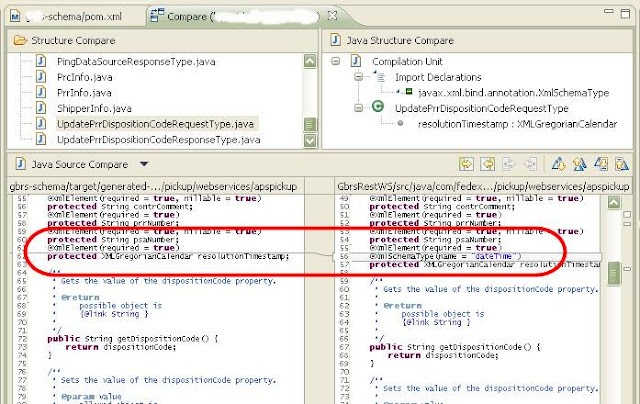
With the xsd defined as:

The 1.1 version of the com.sun.tools.xjc.maven2:maven-jaxb-plugin will not generate the XMLSchemaType "dateTime" however the 1.1.1 version does generate the correct XMLSchemaType.
By comparison if you choose to use the org.jvnet.jaxb2.maven2:maven-jaxb2-plugin it will generate the XMLSchemaType.
Here the comparison between 1.1 and 1.1.1 of the com.sun.tools.xjc.maven2:maven-jaxb-plugin.

<plugin>
                <groupId>com.sun.tools.xjc.maven2</groupId>
                <artifactId>maven-jaxb-plugin</artifactId>
                <version>1.1.1</version>
                <executions>
                    <execution>
                        <phase>generate-sources</phase>
                        <goals>
                            <goal>generate</goal>
                        </goals>
                    </execution>
                </executions>
                <configuration>
                    <removeOldOutput>true</removeOldOutput>
                    <schemaDirectory>src/main/schema/</schemaDirectory>
                    <includeSchemas>
                        <includeSchema>**/*.xsd</includeSchema>
                    </includeSchemas>
                    <strict>true</strict>
                    <verbose>false</verbose>
                    <extension>true</extension>
                    <readOnly>yes</readOnly>
                </configuration>
            </plugin>
Subscribe to:
Posts (Atom)